 
_(Alternative artwork proposals are welcome! Submit one through an Issue.)_
# Saves Microsoft Stream videos for offline enjoyment
### v2.1 Release, codename _Hammer of DawnTM_
This release would not have been possible without the code and time contributed by two distinguished developers: [@lukaarma](https://github.com/lukaarma) and [@kylon](https://github.com/kylon). Thank you!
[Politecnico di Milano][polisite] students may want to use this fork over at https://github.com/SamanFekri/destreamer which is a specialized implementation of this project with automatic logon.
Another specialized implementation (for University of Pisa this time) is available at https://github.com/Guray00/destreamer-unipi.
## What's new
- Major code refactoring (all credits to @lukaarma)
- Destreamer is now able to refresh the session's access token. Use this with `-k` (keep cookies) and tick "Remember Me" on login.
- We added support for closed captions (see `--closedCaptions` below)
## Disclaimer
Hopefully this doesn't break the end user agreement for Microsoft Stream. Since we're simply saving the HLS stream to disk as if we were a browser, this does not abuse the streaming endpoints. However i take no responsibility if either Microsoft or your Office 365 admins request a chat with you in a small white room.
## Prereqs
- [**Node.js**][node]: You'll need Node.js version 8.0 or higher. A GitHub Action runs tests on all major Node versions on every commit. One caveat for Node 8, if you get a `Parse Error` with `code: HPE_HEADER_OVERFLOW` you're out of luck and you'll need to upgrade to Node 10+.
- **npm**: usually comes with Node.js, type `npm` in your terminal to check for its presence
- [**ffmpeg**][ffmpeg]: a recent version (year 2019 or above), in `$PATH` or in the same directory as this README file (project root).
- [**git**][git]: one or more npm dependencies require git.
Destreamer takes a [honeybadger](https://www.youtube.com/watch?v=4r7wHMg5Yjg) approach towards the OS it's running on. We've successfully tested it on Windows, macOS and Linux.
## Limits and limitations
Make sure you use the right script (`.sh`, `.ps1` or `.cmd`) and escape char (if using line breaks) for your shell.
PowerShell uses a backtick [ **`** ] and cmd.exe uses a caret [ **^** ].
Note that destreamer won't run in an elevated (Administrator/root) shell. Running inside **Cygwin/MinGW/MSYS** may also fail, please use **cmd.exe** or **PowerShell** if you're on Windows.
**WSL** (Windows Subsystem for Linux) is not supported as it can't easily pop up a browser window. It *may* work by installing an X Window server (like [Xming][xming]) and exporting the default display to it (`export DISPLAY=:0`) before running destreamer. See [this issue for more on WSL v1 and v2][wsl].
## How to build
To build destreamer clone this repository, install dependencies and run the build script -
```sh
$ git clone https://github.com/snobu/destreamer
$ cd destreamer
$ npm install
$ npm run build
```
## Usage
```
$ ./destreamer.sh
Options:
--help Show help [boolean]
--version Show version number [boolean]
--username, -u The username used to log into Microsoft Stream (enabling this will fill in the email field for
you) [string]
--videoUrls, -i List of video urls [array]
--inputFile, -f Path to text file containing URLs and optionally outDirs. See the README for more on outDirs.
[string]
--outputDirectory, -o The directory where destreamer will save your downloads [string] [default: "videos"]
--keepLoginCookies, -k Let Chromium cache identity provider cookies so you can use "Remember me" during login
[boolean] [default: false]
--noExperiments, -x Do not attempt to render video thumbnails in the console [boolean] [default: false]
--simulate, -s Disable video download and print metadata information to the console[boolean] [default: false]
--verbose, -v Print additional information to the console (use this before opening an issue on GitHub)
[boolean] [default: false]
--closedCaptions, --cc Check if closed captions are aviable and let the user choose which one to download (will not
ask if only one aviable) [boolean] [default: false]
--noCleanup, --nc Do not delete the downloaded video file when an FFmpeg error occurs [boolean] [default: false]
--vcodec Re-encode video track. Specify FFmpeg codec (e.g. libx265) or set to "none" to disable video.
[string] [default: "copy"]
--acodec Re-encode audio track. Specify FFmpeg codec (e.g. libopus) or set to "none" to disable audio.
[string] [default: "copy"]
--format Output container format (mkv, mp4, mov, anything that FFmpeg supports)
[string] [default: "mkv"]
--skip Skip download if file already exists [boolean] [default: false]
```
- Passing `--username` is optional. It's there to make logging in faster (the username field will be populated automatically on the login form).
- You can use an absolute path for `-o` (output directory), for example `/mnt/videos`.
- We default to `.mkv` for the output container. If you prefer something else (like `mp4`), pass `--format mp4`.
Download a video -
```sh
$ ./destreamer.sh -i "https://web.microsoftstream.com/video/VIDEO-1"
```
Download a video and re-encode with HEVC (libx265) -
```sh
$ ./destreamer.sh -i "https://web.microsoftstream.com/video/VIDEO-1" --vcodec libx265
```
Download a video and speed up the interactive login by automagically filling in the username -
```sh
$ ./destreamer.sh -u user@example.com -i "https://web.microsoftstream.com/video/VIDEO-1"
```
Download a video to a custom path -
```sh
$ ./destreamer.sh -i "https://web.microsoftstream.com/video/VIDEO-1" -o /Users/hacker/Downloads
```
Download two or more videos -
```sh
$ ./destreamer.sh -i "https://web.microsoftstream.com/video/VIDEO-1" \
"https://web.microsoftstream.com/video/VIDEO-2"
```
Download many videos but read URLs from a file -
```sh
$ ./destreamer.sh -f list.txt
```
### Input file
You can create a `.txt` file containing your video URLs, one video per line. The text file can have any name, followed by the `.txt` extension.
Additionally you can have destreamer download each video in the input list to a separate directory.
These optional lines must start with white space(s).
Usage -
```
https://web.microsoftstream.com/video/xxxxxxxx-aaaa-xxxx-xxxx-xxxxxxxxxxxx
-dir=videos/lessons/week1
https://web.microsoftstream.com/video/xxxxxxxx-aaaa-xxxx-xxxx-xxxxxxxxxxxx
-dir=videos/lessons/week2"
```
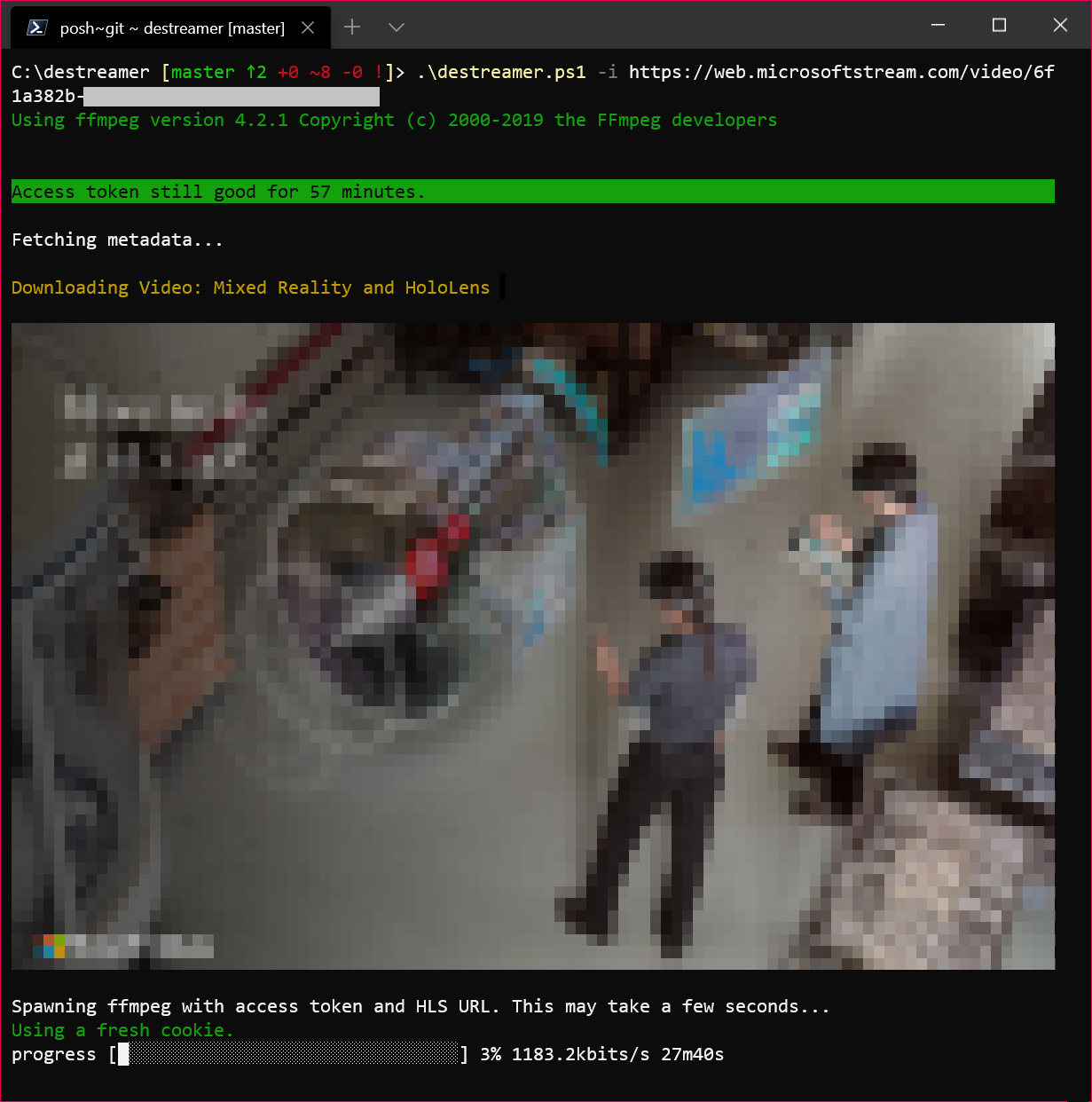
## Expected output
Windows Terminal -
iTerm2 on a Mac -
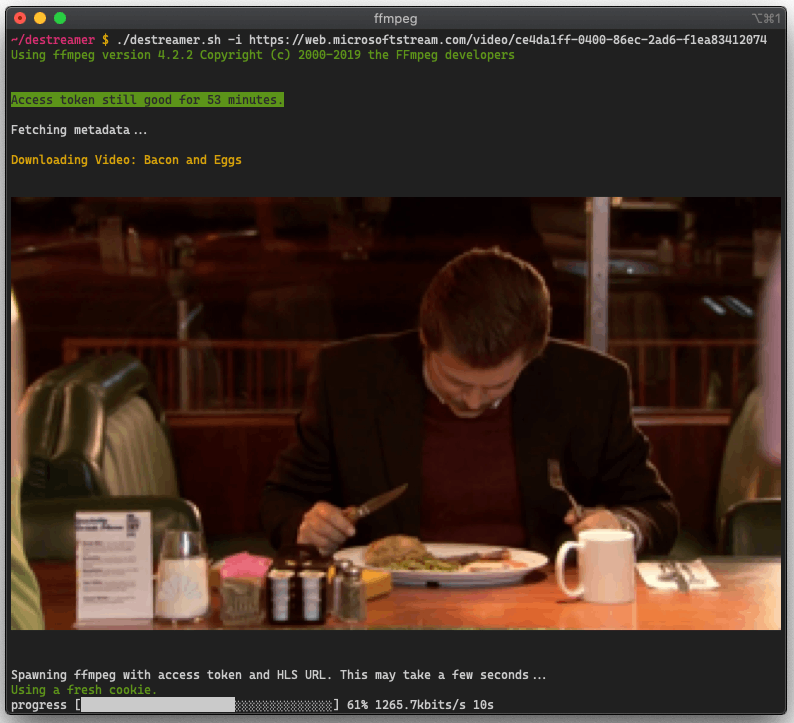
By default, downloads are saved under `videos/` unless specified by `-o` (output directory).
## Contributing
Contributions are welcome. Open an issue first before sending in a pull request. All pull requests require at least one code review before they are merged to master.
## Found a bug?
Please open an [issue](https://github.com/snobu/destreamer/issues) and we'll look into it.
[ffmpeg]: https://www.ffmpeg.org/download.html
[xming]: https://sourceforge.net/projects/xming/
[node]: https://nodejs.org/en/download/
[git]: https://git-scm.com/downloads
[wsl]: https://github.com/snobu/destreamer/issues/90#issuecomment-619377950
[polisite]: https://www.polimi.it

_(Alternative artwork proposals are welcome! Submit one through an Issue.)_
# Saves Microsoft Stream videos for offline enjoyment
### v2.1 Release, codename _Hammer of DawnTM_
This release would not have been possible without the code and time contributed by two distinguished developers: [@lukaarma](https://github.com/lukaarma) and [@kylon](https://github.com/kylon). Thank you!
[Politecnico di Milano][polisite] students may want to use this fork over at https://github.com/SamanFekri/destreamer which is a specialized implementation of this project with automatic logon.
Another specialized implementation (for University of Pisa this time) is available at https://github.com/Guray00/destreamer-unipi.
## What's new
- Major code refactoring (all credits to @lukaarma)
- Destreamer is now able to refresh the session's access token. Use this with `-k` (keep cookies) and tick "Remember Me" on login.
- We added support for closed captions (see `--closedCaptions` below)
## Disclaimer
Hopefully this doesn't break the end user agreement for Microsoft Stream. Since we're simply saving the HLS stream to disk as if we were a browser, this does not abuse the streaming endpoints. However i take no responsibility if either Microsoft or your Office 365 admins request a chat with you in a small white room.
## Prereqs
- [**Node.js**][node]: You'll need Node.js version 8.0 or higher. A GitHub Action runs tests on all major Node versions on every commit. One caveat for Node 8, if you get a `Parse Error` with `code: HPE_HEADER_OVERFLOW` you're out of luck and you'll need to upgrade to Node 10+.
- **npm**: usually comes with Node.js, type `npm` in your terminal to check for its presence
- [**ffmpeg**][ffmpeg]: a recent version (year 2019 or above), in `$PATH` or in the same directory as this README file (project root).
- [**git**][git]: one or more npm dependencies require git.
Destreamer takes a [honeybadger](https://www.youtube.com/watch?v=4r7wHMg5Yjg) approach towards the OS it's running on. We've successfully tested it on Windows, macOS and Linux.
## Limits and limitations
Make sure you use the right script (`.sh`, `.ps1` or `.cmd`) and escape char (if using line breaks) for your shell.
PowerShell uses a backtick [ **`** ] and cmd.exe uses a caret [ **^** ].
Note that destreamer won't run in an elevated (Administrator/root) shell. Running inside **Cygwin/MinGW/MSYS** may also fail, please use **cmd.exe** or **PowerShell** if you're on Windows.
**WSL** (Windows Subsystem for Linux) is not supported as it can't easily pop up a browser window. It *may* work by installing an X Window server (like [Xming][xming]) and exporting the default display to it (`export DISPLAY=:0`) before running destreamer. See [this issue for more on WSL v1 and v2][wsl].
## How to build
To build destreamer clone this repository, install dependencies and run the build script -
```sh
$ git clone https://github.com/snobu/destreamer
$ cd destreamer
$ npm install
$ npm run build
```
## Usage
```
$ ./destreamer.sh
Options:
--help Show help [boolean]
--version Show version number [boolean]
--username, -u The username used to log into Microsoft Stream (enabling this will fill in the email field for
you) [string]
--videoUrls, -i List of video urls [array]
--inputFile, -f Path to text file containing URLs and optionally outDirs. See the README for more on outDirs.
[string]
--outputDirectory, -o The directory where destreamer will save your downloads [string] [default: "videos"]
--keepLoginCookies, -k Let Chromium cache identity provider cookies so you can use "Remember me" during login
[boolean] [default: false]
--noExperiments, -x Do not attempt to render video thumbnails in the console [boolean] [default: false]
--simulate, -s Disable video download and print metadata information to the console[boolean] [default: false]
--verbose, -v Print additional information to the console (use this before opening an issue on GitHub)
[boolean] [default: false]
--closedCaptions, --cc Check if closed captions are aviable and let the user choose which one to download (will not
ask if only one aviable) [boolean] [default: false]
--noCleanup, --nc Do not delete the downloaded video file when an FFmpeg error occurs [boolean] [default: false]
--vcodec Re-encode video track. Specify FFmpeg codec (e.g. libx265) or set to "none" to disable video.
[string] [default: "copy"]
--acodec Re-encode audio track. Specify FFmpeg codec (e.g. libopus) or set to "none" to disable audio.
[string] [default: "copy"]
--format Output container format (mkv, mp4, mov, anything that FFmpeg supports)
[string] [default: "mkv"]
--skip Skip download if file already exists [boolean] [default: false]
```
- Passing `--username` is optional. It's there to make logging in faster (the username field will be populated automatically on the login form).
- You can use an absolute path for `-o` (output directory), for example `/mnt/videos`.
- We default to `.mkv` for the output container. If you prefer something else (like `mp4`), pass `--format mp4`.
Download a video -
```sh
$ ./destreamer.sh -i "https://web.microsoftstream.com/video/VIDEO-1"
```
Download a video and re-encode with HEVC (libx265) -
```sh
$ ./destreamer.sh -i "https://web.microsoftstream.com/video/VIDEO-1" --vcodec libx265
```
Download a video and speed up the interactive login by automagically filling in the username -
```sh
$ ./destreamer.sh -u user@example.com -i "https://web.microsoftstream.com/video/VIDEO-1"
```
Download a video to a custom path -
```sh
$ ./destreamer.sh -i "https://web.microsoftstream.com/video/VIDEO-1" -o /Users/hacker/Downloads
```
Download two or more videos -
```sh
$ ./destreamer.sh -i "https://web.microsoftstream.com/video/VIDEO-1" \
"https://web.microsoftstream.com/video/VIDEO-2"
```
Download many videos but read URLs from a file -
```sh
$ ./destreamer.sh -f list.txt
```
### Input file
You can create a `.txt` file containing your video URLs, one video per line. The text file can have any name, followed by the `.txt` extension.
Additionally you can have destreamer download each video in the input list to a separate directory.
These optional lines must start with white space(s).
Usage -
```
https://web.microsoftstream.com/video/xxxxxxxx-aaaa-xxxx-xxxx-xxxxxxxxxxxx
-dir=videos/lessons/week1
https://web.microsoftstream.com/video/xxxxxxxx-aaaa-xxxx-xxxx-xxxxxxxxxxxx
-dir=videos/lessons/week2"
```
## Expected output
Windows Terminal -

iTerm2 on a Mac -

By default, downloads are saved under `videos/` unless specified by `-o` (output directory).
## Contributing
Contributions are welcome. Open an issue first before sending in a pull request. All pull requests require at least one code review before they are merged to master.
## Found a bug?
Please open an [issue](https://github.com/snobu/destreamer/issues) and we'll look into it.
[ffmpeg]: https://www.ffmpeg.org/download.html
[xming]: https://sourceforge.net/projects/xming/
[node]: https://nodejs.org/en/download/
[git]: https://git-scm.com/downloads
[wsl]: https://github.com/snobu/destreamer/issues/90#issuecomment-619377950
[polisite]: https://www.polimi.it